Pocket1 - Basic Function Introduction
Android 8.0 or higher
Switch1&2
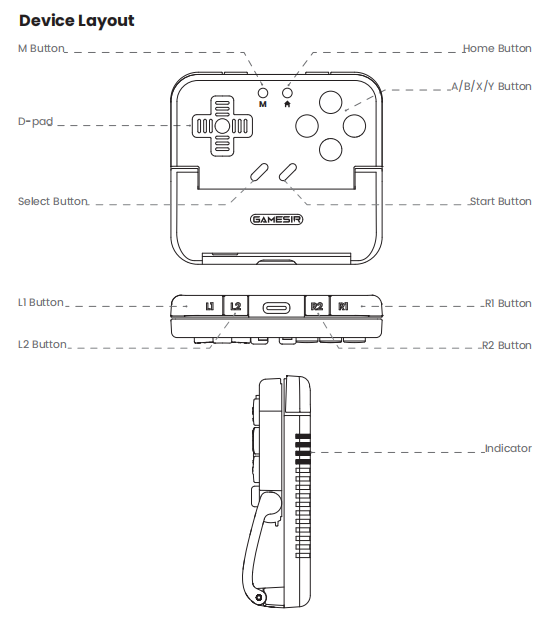
| Power On | Pull the controller open, or press and hold the Home button for 3 seconds while closed to power on | |||
| Power Off | Close the controller for 5 seconds, or press and hold the Home button for 5 seconds while powered on to power off | |||
| Standby | The controller will automatically power off if there is no operation for10 minutes while connected. | |||
| Charging | The controller can be charged via the data cable. When charging while powered off, the indicator will show the chargiing progress with a breathing light effect. | |||
| Battery Level | The current battery level is indicated by the number of indicator lights | |||
| Check Mode | Press and hold the M button to check the current mode of the controller via the indicator light pattern. | |||
| Status | Indicator | Description | |||||||
| Connected | Solid | The device is successfully connected. | |||||||
| Pairing | Flash Rapidly | In pairing status, it can be discovered and connected by a new device. | |||||||
| Reconnecting | Flash Slowly | In reconnecting status, it automatically connects to the last successfully connected device. Press and hold the M and Home buttons for 2 seconds to force the controller into pairing mode. | |||||||
| Platform | Mode | Indicator | Switching Method | ||
| Android | Android Mode |
|
| ||
| Switch | Switch Mode |  |
| ||
| Android | G-Touch Mode |
|
| ||





Function Reset: Press and hold the [Menu + Home keys] simultaneously for 5 seconds.